
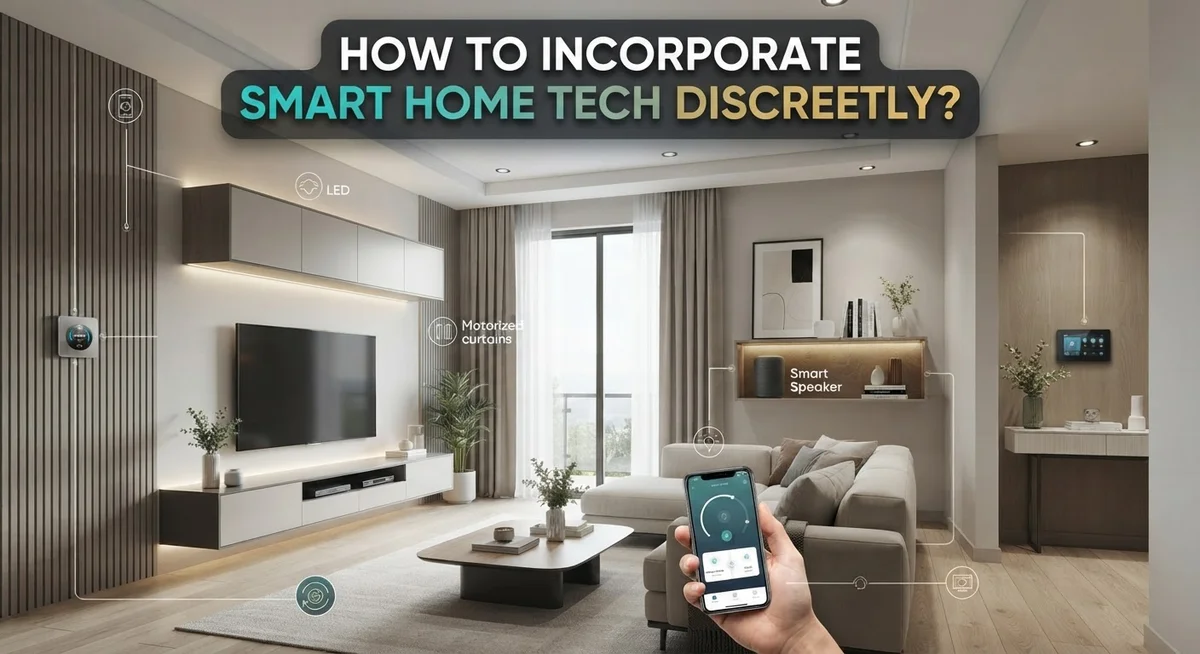
How to Incorporate Smart Home Tech Discreetly?
Smart home tech can make your life easier. But nobody wants wires and gadgets taking over their living room.
The good news? You can enjoy modern convenience without sacrificing style. Discreet smart home integration is totally possible with the right approach.
This guide shows you how to blend technology into your home smoothly. You will learn how to pick a smart hub that keeps everything connected.
We will cover smart lighting, sockets, and security devices. Each step builds on the last, so your setup stays simple and organized.
You will also discover common mistakes people make when adding smart tech. Skipping security steps or ignoring family needs can cause headaches later.
We want your smart home to work for everyone in it. That means planning ahead and choosing devices that fit your lifestyle.
By the end of this article, you will know how to create a smart home. It will feel natural, not overwhelming. Your gadgets will support your daily routine quietly in the background.
Let us walk through the process together, one step at a time.
In a Nutshell
Here is a quick summary to help you get started.
-
Pick one ecosystem first. Choose a hub or app that connects all your devices. This keeps everything simple and easy to control.
-
Build a strong Wi-Fi base. Your smart devices need a secure and stable connection. A weak network causes lag and dropped commands.
-
Start small and grow slowly. Begin with lighting or sockets before adding cameras or sensors. This helps you learn the system without feeling overwhelmed.
-
Turn on every security feature. Enable passwords, encryption, and two factor login. This step protects your home from hacking attempts.
-
Talk to your family first. Ask everyone what they need from the system. This makes the tech useful for the whole household, not just one person.
-
Keep a backup plan ready. Manual switches or backup power keep things running if tech fails. Never rely on one system alone for critical tasks like locks or alarms.
Follow these points and your home will feel smart, safe, and simple to use every day.
What Discreet Smart Home Integration Really Means
Discreet smart home integration means adding technology to your home in ways that don’t dominate your living space or overwhelm your daily routine. The goal is simplicity and invisibility. Your smart devices should work quietly in the background while you enjoy modern convenience.
Think of it like this: your technology should serve you, not announce itself. A discreet system blends into your home’s existing design and aesthetic. Visitors shouldn’t immediately notice that your lights respond to voice commands or your thermostat adjusts automatically.
Practical integration focuses on three key areas. First, your devices must work together seamlessly through one central ecosystem. Second, they should operate without constant manual adjustment. Third, they need to remain secure so you never worry about privacy breaches.
Discreet integration also means respecting your family’s comfort level. Not everyone wants cameras everywhere or voice speakers in every room. A truly discreet system lets people opt in or out of specific features. Some family members might prefer traditional light switches alongside smart controls.
The foundation matters most. A reliable Wi-Fi network and a smart hub or gateway create the backbone of your system. Everything else connects to this foundation. When done right, your smart home requires minimal maintenance and causes zero frustration.
Real discreet integration is about intentional choices. You decide which devices solve actual problems in your home. You control where technology appears and how visible it becomes. This approach prevents your home from feeling like a tech showroom.
Your smart home should enhance life without drawing attention to itself. It operates smoothly, stays secure, and adapts to your family’s needs. That’s what discreet integration truly means.
Planning Your Ecosystem Before You Buy Anything
Before you purchase anything, take time to understand what you actually need. This step prevents wasted money and frustration later. Start by walking through your home and identifying which areas would benefit most from automation.
Ask yourself practical questions first. Do you want to control lighting from your phone? Would a smart thermostat save you energy? Are you interested in security cameras or door sensors? Your answers guide your entire ecosystem choice.
Next, evaluate your current Wi-Fi setup. Smart devices require a stable, secure network to function properly. Check if your router reaches all rooms where you plan to install devices. Weak signals cause devices to disconnect and behave unpredictably. You may need to upgrade your router or add a mesh system before adding any smart tech.
Consider which ecosystem makes sense for your household. Different platforms like Amazon, Google, and Apple each have their strengths. Think about which devices you already own and which ones your family members prefer. Compatibility matters because devices from different ecosystems sometimes struggle to communicate smoothly.
Involve your family in the planning phase. Ask everyone what automation would genuinely improve their daily routine. Some people love voice control while others find it annoying. Parents might prioritize security features while kids care more about entertainment options. Getting input now prevents installing features nobody actually wants.
Finally, map out a realistic budget and timeline. Decide whether you’ll add devices all at once or gradually over several months. Spreading purchases out lets you test each addition and adjust your approach based on real results.
This planning stage takes just a few hours but saves significant headaches during installation and daily use.
Step-by-Step: Building a Hidden Smart Home Foundation
Start by selecting a central hub or gateway device. This single control point manages all your smart devices seamlessly. Your hub acts as the brain of the system, allowing everything to communicate together.
Next, establish a dedicated Wi-Fi network for your smart devices. Separate this from your regular internet connection when possible. This approach keeps your personal data safer and prevents device congestion.
Install smart lighting as your first layer. Choose bulbs and switches that fit your ecosystem choice. Lighting offers immediate value and remains invisible when done right—no visible wires or bulky equipment needed.
Add smart sockets and plugs to existing appliances. Plug lamps, fans, or coffee makers into these devices. This method requires zero permanent installation or rewiring.
Create automation routines that work quietly in the background. Program your lights to dim at sunset or your thermostat to adjust before you wake up. The best automation happens without you thinking about it.
Test each device thoroughly before adding the next one. This prevents frustration and helps you catch problems early. Slow integration beats rushed installation every time.
Configure security on every single device immediately. Use strong passwords and enable two factor authentication. Turn on encryption for all wireless connections.
Document your setup as you go. Write down which devices connect to which hub and their functions. Keep this information accessible for troubleshooting or emergencies.
Keep manual overrides for critical systems. Smart thermostats should have physical controls. Lights need backup switches. Security cameras need alternative power sources.
Involve family members at each step. Show them how new features work and ask for feedback. Discreet integration means everyone feels comfortable with the technology in your home.
Concealing Hubs, Wiring, and Sensors Without Losing Function
Smart home hubs and wiring can dominate your space if you don’t plan carefully. The good news is that most components hide easily with smart placement and creative solutions.
Start with hub placement. Your central hub needs a reliable Wi-Fi signal, but it doesn’t need to sit on your coffee table. Place it in a closet, cabinet, or utility room where it stays out of sight. Most hubs work fine in enclosed spaces as long as they have adequate ventilation. Check your specific device’s requirements before hiding it away.
Wiring requires thoughtful planning. Run cables behind walls, under baseboards, or through existing conduits before walls are sealed. If you’re renting, use cable management boxes that blend with your walls or furniture. Adhesive cable clips guide wires along baseboards in neutral colors that disappear into your home’s design.
Sensors need strategic hiding too. Motion sensors work best in corners or high shelves where they blend with your décor. Door and window sensors mount on the frame edge where they’re barely visible. Temperature sensors can sit on shelves with other items rather than standing alone on nightstands.
Maintain full functionality while hiding components. Your hub must communicate clearly with all devices regardless of location. Test your Wi-Fi strength in hiding spots using a simple signal checker. If signal drops too much, move the hub slightly or add a Wi-Fi extender in a less visible area.
Keep manual overrides accessible. Even hidden systems need physical controls for emergencies. Ensure light switches and thermostat controls remain easy to reach. This balance between concealment and accessibility makes your smart home both invisible and reliable.
Tips for Blending Smart Devices Into Existing Décor
Smart devices don’t need to announce themselves in your home. The key is choosing products that blend naturally with your existing style while staying fully functional.
Start with color coordination. Most smart bulbs, switches, and outlets come in standard finishes like white, black, and brushed metal. Match these to your current wall plates and fixtures. Your smart lights will disappear into the background when they match your existing décor scheme.
Consider placement strategy. Smart speakers work well on shelves behind other items or inside cabinets with open backs for sound projection. Motion sensors fit naturally on crown molding or inside picture frames. Cameras can mount inside decorative boxes or blend with your bookshelf styling.
Wireless devices offer major advantages here. You avoid visible cables running across walls or along baseboards. This makes installation faster and keeps your space cleaner looking.
Think about scale and proportion. Smaller devices integrate better than chunky alternatives. A slim smart thermostat takes up less wall space than a traditional one. Compact smart plugs don’t block adjacent outlets or stick out awkwardly.
Use existing furniture to your advantage. Place hub devices inside entertainment centers or on shelves behind plants. Tuck wiring behind existing cabinets or furniture rather than running it visibly across rooms.
Test visibility from different angles before finalizing placement. Walk through each room and check sight lines. What you see when standing matters more than what appears in photos.
Your automation should feel invisible to guests. Lights adjust quietly. Temperature changes happen without notice. Security sensors stay hidden. This approach keeps your home looking intentional and designed, not tech-forward or cluttered.
Securing Your Network So Convenience Doesn’t Compromise Privacy
Your network security determines whether your smart home stays private or becomes a vulnerability. Start by creating a separate Wi-Fi network exclusively for your smart devices. This keeps them isolated from computers, phones, and sensitive personal data. Your main network remains protected even if someone compromises a smart bulb or speaker.
Change all default passwords immediately. Manufacturers use the same passwords across thousands of devices, making them easy targets. Create unique, strong passwords for each device and your hub. Store them securely so you can access them later if needed.
Enable encryption on every connection. Look for WPA3 or WPA2 security standards in your router settings. These encrypt data traveling between your devices and hub. Without encryption, information moves across your network unprotected.
Update firmware regularly. Manufacturers release updates to patch security holes. Most smart devices allow automatic updates, which is the easiest approach. Check your hub settings to enable this feature across all connected devices.
Disable unnecessary features on devices you don’t use. A smart speaker doesn’t need microphone access if you control it through your phone. A camera doesn’t need cloud storage if local storage works for you. Fewer active features mean fewer entry points for hackers.
Set up two-factor authentication wherever available. This adds a second verification step when logging into your hub or accounts. Even if someone guesses your password, they cannot access your system without this second code.
Review privacy settings in your hub’s app. Disable data collection features you don’t need. Turn off voice analysis, activity tracking, or cloud backups unless they’re essential to your automation goals.
Test your network security by checking your router’s admin panel. Verify that unknown devices haven’t connected to your system. Regular checks catch problems before they become serious issues.
Common Mistakes That Make Smart Tech Look Obvious
Many people make smart home installations look awkward and obvious. Understanding these mistakes helps you avoid them.
Buying devices without a plan is the biggest error. You purchase a smart speaker here, a camera there, and sensors everywhere. Soon your home looks cluttered with mismatched tech. Instead, decide what you actually need before spending money. List your priorities. Do you want climate control? Security? Lighting? This prevents impulse purchases that don’t fit your space.
Ignoring your family’s input creates another problem. You automate everything without asking household members what they want. They feel confused by sudden changes. Their routines get disrupted. Talk to everyone first. Ask what automation would genuinely help them. Include their preferences in your planning.
Neglecting security from the start makes your system vulnerable. You connect devices without changing default passwords or enabling encryption. Hackers can access your network easily. This isn’t just inconvenient. It compromises your privacy and safety. Security should be your foundation, not an afterthought.
Failing to maintain backups leaves you helpless when something fails. Your hub crashes. Your internet drops. You have no alternative way to control critical systems like locks or thermostats. Build redundancy into your setup. Know what happens when your main connection fails.
Skipping the incremental approach overwhelms your home. You install everything at once. Your family gets frustrated learning dozens of new systems simultaneously. Start small. Add one system, master it, then expand. This gradual process feels natural and manageable.
Poor device placement makes tech visible and awkward. You mount cameras on obvious walls. Speakers sit prominently on counters. Sensors stick out from corners. Think about where each device actually belongs before installation. Strategic placement hides technology while maintaining full functionality.
Troubleshooting Interoperability and Connectivity Issues
When your smart home devices stop communicating with each other, the problem usually stems from one of three areas: your network, your hub, or incompatible device protocols.
Start by checking your Wi-Fi connection. Move closer to your router and see if the device responds. If it does, you’ve found your culprit. Weak signals cause most connectivity failures. Consider adding a Wi-Fi extender in dead zones, or reposition your router to a central location in your home.
Next, restart your smart home hub. Unplug it for 30 seconds, then plug it back in. This simple step resolves many communication glitches between your hub and devices.
Verify that all devices use the same communication standard. Some devices rely on Wi-Fi, while others use Bluetooth, Zigbee, or Z-Wave. Your hub must support every protocol you’re using. Check your device manuals to confirm compatibility before troubleshooting further.
Update your device firmware regularly. Manufacturers release updates that fix connectivity bugs and improve performance. Most hubs allow automatic updates through their apps.
If one device keeps disconnecting, try removing it from your hub and re-adding it. This refreshes the connection and often resolves persistent issues.
Enable WPA2 or WPA3 encryption on your network. Poor security settings can actually interfere with device communication. Access your router’s settings and confirm encryption is active.
Finally, reduce the number of devices connecting simultaneously if you have many smart products. Older routers struggle with dozens of connections. Prioritize which devices matter most and add others gradually.
Keep detailed notes about which devices work and which don’t. This information helps you identify patterns and pinpoint the real problem faster.
Final Thoughts
Smart home tech works best when it stays in the background. Your goal is simple. Add convenience without changing how your space looks or feels.
Start small and build up. Choose one hub that connects well with other devices. This keeps your system simple and easy to manage.
Planning matters more than buying gadgets. Think about what your household actually needs before you purchase anything. This saves money and prevents clutter.
Security should never be an afterthought. Weak passwords and outdated firmware put your whole home at risk. Strong security also keeps your devices running smoothly.
Family input shapes a better system. Everyone in your home uses these devices differently. Their needs help you choose the right automation for daily life.
Interoperability ties everything together. Devices that talk to each other create a smoother experience. This also reduces the awkward look of mismatched tech.
Backups protect you when something fails. A single glitch should not shut down your entire home. Keep manual overrides ready for critical systems like locks and lights.
Discreet smart homes feel natural. Guests should notice comfort, not wires or blinking lights. Good planning and careful placement make this possible.
Technology should support your lifestyle. It should not take over your home’s appearance. The best systems work quietly and reliably every day.
Take your time with each step. Add one device, test it, then move to the next. This method keeps your home secure, functional, and visually simple.
Smart living means smart choices. A discreet setup gives you comfort now and flexibility for whatever comes next.
Frequently Asked Questions
Do I actually need a smart hub, or can I just use my phone?
A smart hub acts as the central command center for your devices. Your phone controls them, but the hub manages everything behind the scenes. Without a hub, your devices struggle to communicate with each other. They also depend entirely on your phone’s connection, which creates gaps in automation.
A hub keeps your system running even when your phone is elsewhere or powered off. It responds faster and handles more devices simultaneously. Think of it as the difference between a relay race and individual runners.
What’s the best way to start if I’m a complete beginner?
Begin with one foundational device like a smart thermostat or lighting system. This teaches you how your ecosystem works without overwhelming your home. Add one device every few weeks rather than purchasing everything at once.
Choose devices that solve real problems in your daily life. If you hate adjusting lights manually, start there. If temperature control frustrates you, begin with climate devices. This approach keeps your installation natural and purposeful.
How do I prevent my smart home from looking like a tech showroom?
Conceal devices within existing fixtures and furniture. Smart bulbs fit into regular lamp sockets. Outlets hide behind furniture. Cameras mount in corners or blend with decor. Speakers sit on shelves alongside books and decorations.
Avoid clustering devices in obvious spots. Spread them throughout rooms so they become part of the environment, not the focus. Subtle integration makes technology invisible to visitors.
Can my family members control the system too?
Yes. Most hubs allow multiple user accounts with different permission levels. Some family members might control everything, while others access only specific devices like lights or thermostats.
Set up permissions that match each person’s needs. This prevents accidental changes and keeps everyone comfortable with the system.

Phil is the founder and creative mind behind Aesthetic Space Finds, a home decor enthusiast dedicated to helping people transform their living spaces through honest product reviews, in-depth comparisons, and expert buying guides. With a keen eye for design and a passion for discovering hidden gems in the world of home accessories, Phil curates content that makes stylish, functional living accessible to everyone.


